G-code is a command language for CNC machines: a series of lines of text that describe movements. In this language, G94 and G93 are two ways of defining movement speeds.
In milling, the G94 speed mode is generally used, because there is a single path: that of the tool head.
But in 4-axis hot wire cutting, there are two paths that must stay synchronised (when one side covers a segment, the other side must cover one too) but that can be completely different.
So the G93 mode has to be used: for each pair of segments, it imposes a duration shared by both sides. It is the mode every 4-axis hot wire cutting G-code should use, the only one that gives perfect cuts in every situation.
A milling machine has a single tool. The wire has two ends.
On a milling machine, the question does not arise: there is one tool, therefore one path, therefore one speed. That is the F in G94: a speed along the tool’s path.
In 4-axis hot wire CNC, there are two ends, side 1 and side 2, following two paths. So how do you define “the” speed?
The reasoning found in some software is to use G94 mode, pick a “master” side (usually the faster one), and derive the speed of the other side in proportion to the segment lengths.
Why G94 seems to work
The trap is that this approach seems to work. When the profiles on both sides come from the same file and differ only in size, and there is no fixed point (see below), “one master side, the other at the ratio of the lengths” gives the same result as G93.
But… there are many cases where the result is wrong, or even… impossible! The cut may still run, but it won’t be smooth: there will be jerks, and the result won’t have the right dimensions.
Case 1: the Impossible Rectangle
Here, you can’t define a “faster” side, because the faster segment changes sides.
Look at the figure below: on side 1, the wire cuts a narrow rectangle standing up, 108 mm by 10 mm; on side 2, it cuts the same rectangle, lying down. Start the cut with the orange button under the figure, and watch which side goes faster.
At every change of segment, the hierarchy flips: the long side of one is the short side of the other. One side races at 6.0 mm/s while the other crawls at 0.55 mm/s, then they swap roles. Neither side can be “the faster one”.
You’ll tell me: fine, but that doesn’t stop you from picking a master side. For example, side 1.
All right, but what if side 1 doesn’t move at all? How do you define its speed?
The fixed-point case
Flying-wing builders from before CNC all know the fixed-point technique: by making the line that carries the wire pass through a fixed point, you only have to move the other end, and you can cut a tapered wing with a single template (much easier when you’re on your own).
I’ve illustrated it in HotWire4X:
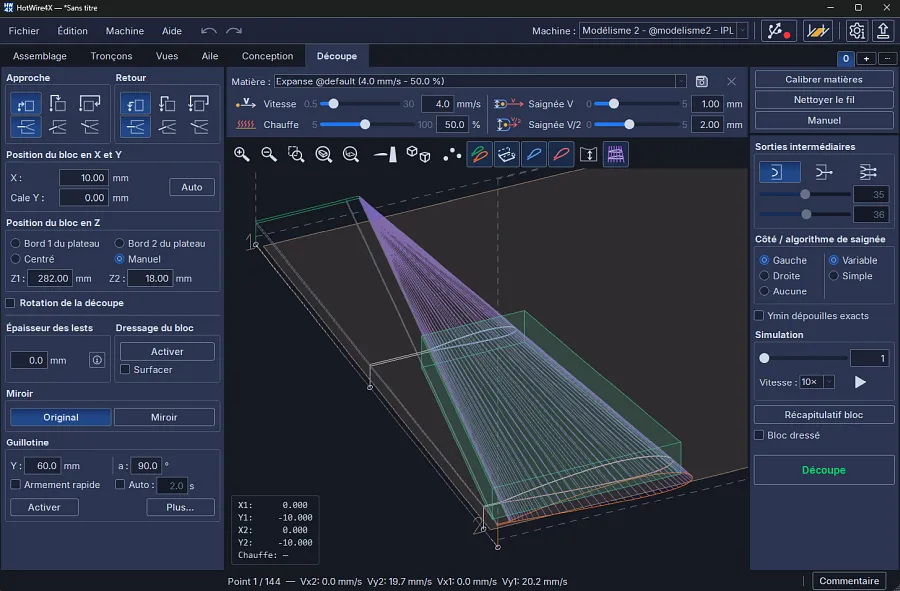
As you can see above, in some situations side 1 or side 2 barely moves.
Impossible to have a master side, or to compute a proportion from lengths close to zero (dividing by zero gives an infinite result).
G93 saves the day
Instead of imposing a speed, you impose a duration per pair of segments.
Each side must cover its own length in that shared time, and its speed follows from it (it can even be zero, with the carriage at rest). That is exactly what the G93 speed mode does.
The pioneers understood this as far back as direct control through the parallel port, which imposed timing by construction; later, so did the designer of the IPL5X, which works with one USB burst per pair of segments. (Discover the whole saga on the Story page.)
What this means for you
- When choosing cutting software that handles G-code, I would ask: does it emit G93? If the answer is no, move on.
- When choosing a G-code interface firmware, I would ask: does this firmware support G93? If the answer is no, move on.
As you might guess, HotWire4X emits G93, and the G-code firmwares I provide support it. See the software.
The faster side, right now:
—
- side 1 path (rear)
- side 2 path (front)
- the wire and the swept surface
- the block — green as in the software
Real duration of this cut: 72 s, four segments of 18 s. The animation runs ×6 faster.